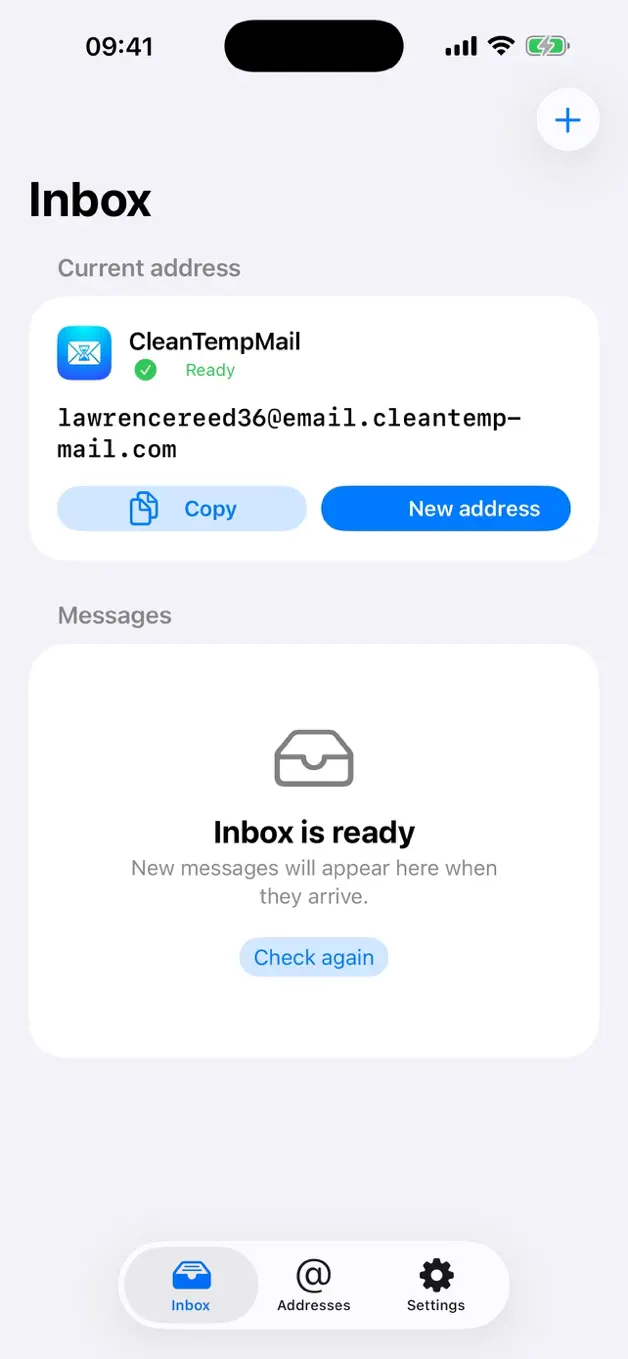
CleanTempMail for iOS is now available on the App Store. The new native app brings the quickest parts of temporary email - creating an address, copying it into a form, and reading the message that follows - into a focused experience for iPhone and iPad.
Version 1.0 is free, requires iOS 17 or later, and does not require a CleanTempMail account. You can download CleanTempMail from the App Store today.
Get CleanTempMail on the App Store

Why We Built a Native iOS App
Temporary email is often a short, time-sensitive task. You are signing up for a low-risk service, testing a website, downloading a resource, or waiting for a confirmation message. Opening another browser tab and repeatedly refreshing an inbox works, but it is unnecessary friction on a phone.
The iOS app is designed around that small workflow. Choose an active domain, create an address in seconds, copy it into the form you are completing, and return to a native inbox when the message arrives. There is no account-registration step between you and the temporary address.
A Focused Inbox, Not Another Email Account
CleanTempMail does not try to replace your permanent email provider. It gives you a separate inbox for non-sensitive messages that do not need to be connected to your personal address.
- Multiple active domains: choose from the available domain catalog, with
email.cleantempmail.comready by default. - Instant address creation: generate an address and copy it directly into a sign-up form.
- Optional new-mail notifications: receive an alert when mail arrives instead of repeatedly checking the app.
- Automatic refresh while open: the inbox can refresh while you are actively using it without relying on continuous background polling.
- Local address history: return to recent addresses and preserve read state on your device.
- Light and dark appearance: the interface follows the way you use iOS.
Privacy Defaults That Reduce Unnecessary Exposure
A temporary address is useful because it separates a low-value interaction from your long-term identity. The app supports that goal with several deliberate defaults.
Remote images in email are blocked by default. Those images can include tracking pixels that tell a sender when a message was opened and reveal network-related information. Address history and read state remain local to the device, the app does not require a CleanTempMail account, and the app does not include an advertising SDK.
These choices reduce unnecessary exposure, but they do not turn temporary email into private long-term storage or end-to-end encrypted communication. Messages still pass through the CleanTempMail service and are removed according to the service retention policy. The App Store privacy label and our privacy policy explain how data may be handled when particular features are used.


Good Uses for CleanTempMail on iPhone and iPad
The app is most useful when an email address is required but the relationship is temporary and low risk. Practical examples include:
- Trying a new app or online tool before deciding whether to keep it.
- Receiving a confirmation link for a low-risk forum or community.
- Separating a one-time download or newsletter sample from your personal inbox.
- Testing registration and email-delivery flows during development or quality assurance.
- Keeping promotional follow-up away from the address you use for work, family, and important accounts.
The important test is simple: if losing access to the address could cost you money, lock you out of something important, or expose confidential information, use a permanent email address that you control instead.
Where Temporary Email Does Not Belong
Do not use CleanTempMail for banking, cryptocurrency accounts, purchases you may need to recover, health or legal documents, cloud storage, primary social accounts, password recovery, or any service that matters beyond the temporary task in front of you.
Temporary inboxes have a retention window and are not designed to become permanent identities. That limitation is a feature when the goal is separation, but it makes them the wrong tool for valuable or sensitive accounts.
Launch Details
- Release: Version 1.0, launched August 25, 2026.
- Price: Free.
- Devices: iPhone and iPad.
- Requirement: iOS 17.0 or later.
- Download size: approximately 4.2 MB.
- Languages: English, Simplified Chinese, Traditional Chinese, French, Japanese, Korean, Spanish, and Russian.
One Clear Goal
We built the first iOS release around one clear goal: make a disposable inbox feel immediate without pretending it should replace your real email. Create an address when you need separation, receive the message, and keep the rest of your digital life attached to an inbox you trust for the long term.
Download CleanTempMail for iPhone and iPad on the App Store. For questions or feedback, visit the CleanTempMail Help Center.